
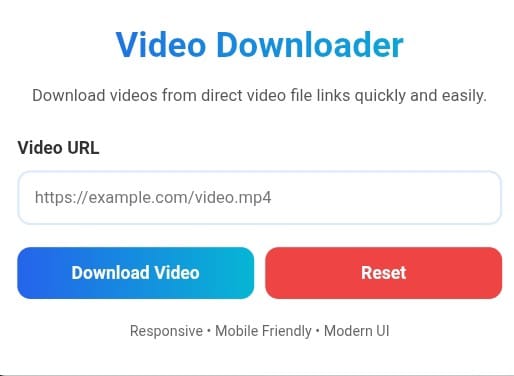
Video Downloader Web Application
Video Downloader is a modern web application designed to help users download publicly accessible video files through direct video URLs. The application is lightweight, responsive, and optimized for mobile devices, tablets, laptops, and desktop computers. The goal of this tool is to provide a clean and user-friendly interface that allows visitors to quickly enter a video URL and initiate a download process.
The application uses HTML, CSS, and JavaScript to deliver a fast user experience without requiring complicated installation steps. Users can open the web page, paste a valid video file URL, and click the download button. The design focuses on simplicity, performance, accessibility, and usability. The interface adapts automatically to different screen sizes, making it convenient for users who access the application from smartphones or tablets.
This video downloader interface supports direct video links such as MP4, WebM, and OGG files. Since modern browsers include built-in download functionality, the application leverages standard browser capabilities to provide a straightforward downloading experience. The design includes validation features that help users ensure they have entered a valid URL before starting the process.
The user interface is built with responsive web design principles. Flexible layouts, scalable typography, and adaptive spacing ensure that the application remains visually appealing across various devices. The modern gradient color scheme provides a professional appearance while maintaining readability and accessibility standards.
A reset button is included to improve usability. Users can quickly clear the input field and start over without manually deleting the entered text. This feature is particularly useful when downloading multiple files or testing different URLs.
How to Use: Step 1: Copy a direct video file URL from a trusted source. Step 2: Paste the URL into the video URL input field. Step 3: Click the Download Video button. Step 4: Wait briefly while the application validates the URL. Step 5: The browser will open the video file and begin downloading it when supported. Step 6: Save the file to your preferred location on your device.
The application emphasizes performance optimization. Minimal JavaScript is used to reduce page load times and improve responsiveness. Lightweight styling techniques help ensure a smooth experience even on lower-powered mobile devices. Fast loading speeds contribute positively to user engagement and search engine visibility.
Accessibility is also an important consideration. Semantic HTML elements, proper labels, and structured content help improve compatibility with assistive technologies. Search engines can understand the page content more effectively, while screen readers can navigate the interface with greater accuracy.
This web application is suitable for educational purposes, web development projects, UI demonstrations, and learning exercises related to HTML, CSS, JavaScript, responsive design, and browser-based file downloading. Developers can further enhance the project by integrating server-side technologies, APIs, database systems, authentication features, analytics, cloud storage, or additional media processing capabilities.
Video Downloader demonstrates best practices in responsive design, user interface development, and client-side scripting. The clean structure makes the project easy to customize and extend. Developers can modify colors, layouts, typography, animations, and functionality according to specific project requirements.
The application is intentionally designed with a modern appearance that balances aesthetics and functionality. Rounded corners, subtle shadows, gradient accents, and responsive controls contribute to a professional user experience. Whether accessed from a mobile phone, tablet, laptop, or desktop computer, the application maintains consistent usability and visual quality.